Paying users first: every setting explained.
One pool of rented GPUs serves a Llama-3-70B model to three kinds of traffic at once: urgent requests, such as paying users in a live chat, with a tight speed promise; ordinary interactive chat; and background work that can wait for hours (reports, summaries and bulk jobs, with a 4-hour deadline).
01Tool by tool
Factory settings vs AlphaTango.
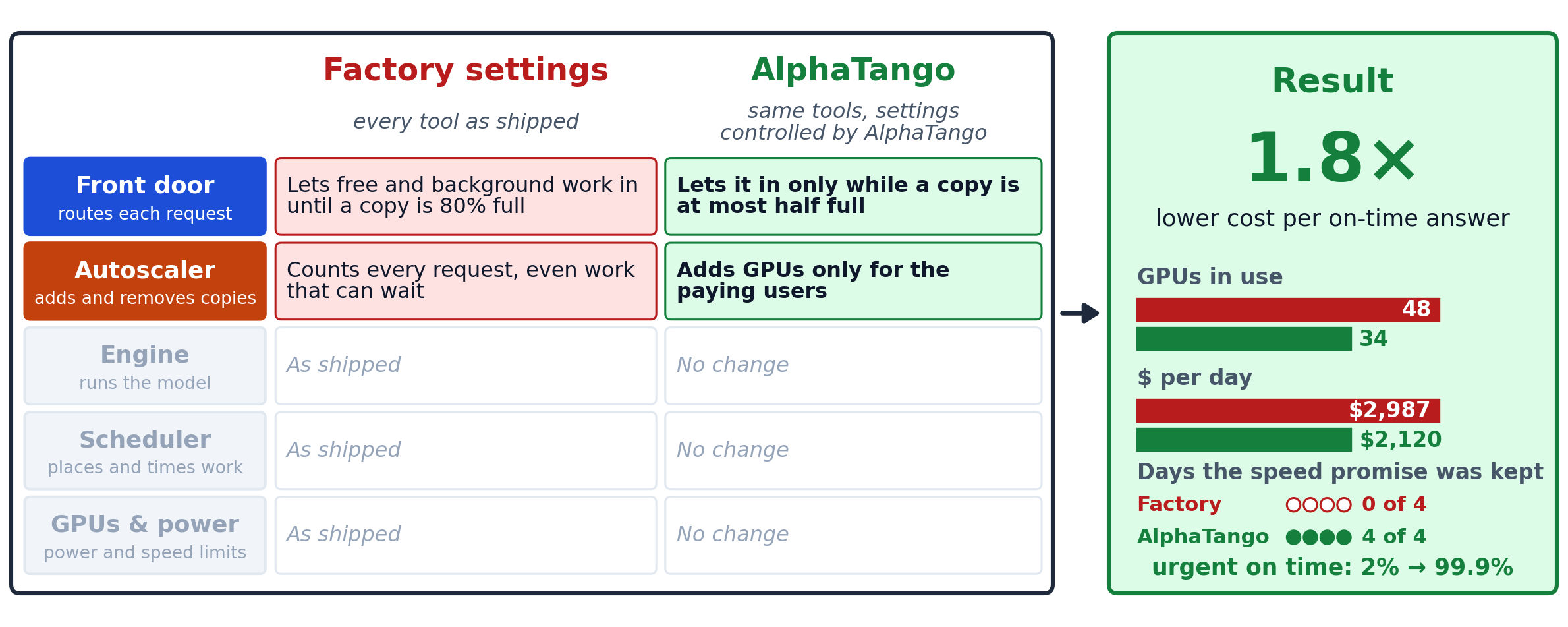
The same table as the diagram, with each setting explained. AlphaTango keeps every tool in place and controls only their settings, all tuned together for one goal for the whole service: the lowest cost per answer delivered within its speed promise.
| Tool | Factory settings (every tool as shipped) | AlphaTango (same tools, settings controlled by AlphaTango) |
|---|---|---|
| Front doorthe router that decides which copy of the model handles each request | Lets free and background work in until a copy is 80% fullLets free and background traffic in while a copy is less than 80% full | Lets it in only while a copy is at most half fullLets it in only while a copy is at most half full, so urgent answers stay fast |
| Autoscaleradds and removes copies of the model as traffic changes | Counts every request, even work that can waitCounts every request when deciding how many GPUs to rent | Adds GPUs only for the paying usersSizes the fleet for the paying users and stops counting work that can wait |
| Enginethe serving engine that runs the model on the GPUs | As shipped | No change |
| Scheduler & GPU managerdecides where copies run, how many GPUs each gets and when batch work runs | As shipped | No change |
| GPUs & powerGPU power limits and clock settings | As shipped | No change |
02Where factory settings fall short
Why the factory set-up costs more.
Each tool runs with its vendor’s default settings and knows nothing about the others. Where that falls short in this case:
The front door lets free and background traffic in whenever a running copy of the model is less than 80% full. Each copy then handles so many requests at once that every answer slows down.
When the autoscaler decides how many GPUs to rent, it counts every request as demand, including work that could wait. So it rents extra GPUs to serve background jobs.
The urgent users end up queued behind all that work, and their answers arrive too slowly.
On the first unseen day the pool averaged 48 GPUs, and only 2% of urgent answers met their promise. Over the four test days the promise broke on all four.
03Whole-Service Gate
Kept only if the whole service improved.
✓ The gate for this case
Only two dials changed, on two tools from different vendors. Each rule is small and local, and they were kept only because together the whole service became cheaper per on-time answer, with every paying user's promise kept.
Either change alone does not do it: limiting the front door alone leaves the autoscaler renting GPUs for background work, and changing the autoscaler alone leaves urgent users stuck behind it.
Every candidate change is tested on the AlphaTango Digital Twin, on traffic days the settings had never seen.
04Result
Urgent answers on time: 2% → 99.9%, at 1.8× lower cost
the same as 45% cheaper
and $2,987 → $2,120 a day, on the first unseen day
on that same day
against 0 of 4 at factory settings; 42% to 46% cheaper across the four days
Other tests of the same idea
45% cheaper; 43 GPUs down to 31; $3,645 → $2,582 a day; promise 0 of 4 → 4 of 4 days
59% cheaper
59% to 73% cheaper
36% cheaper; promise 2 of 10 → 9 of 10 days
'3.4× fewer GPUs' compares GPUs switched on, averaged over the day. 'Lower cost per on-time answer' divides what the whole service costs (GPU rental plus electricity) by the work it delivered within its speed promise. Both compare AlphaTango with every tool left at the settings its vendor ships (factory settings). Results come from AlphaTango's whole-system simulator, built on its Digital Twin and run on public traffic recordings, scored on days the settings had never seen. GPU prices are rental list prices.